
Napster - AI Music & Experts
Napster Music, IncMusic & Audio
2.959.49K Reviews
- Version
- Varies With Device
- Installs
- 10.00M
- Age Rating
- Teen
Screenshots

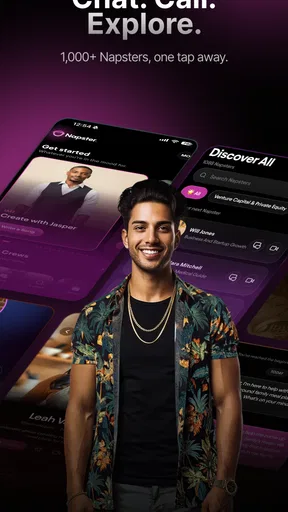
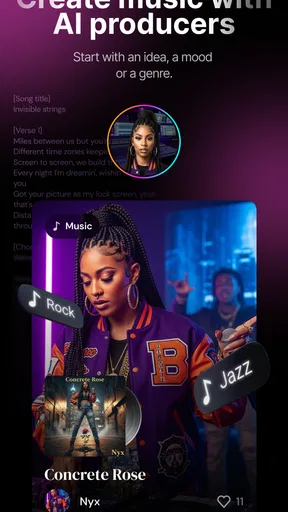
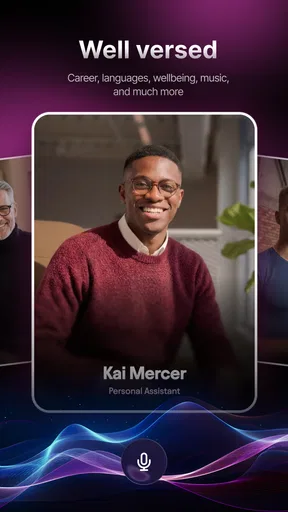
Our Review of Napster - AI Music & Experts
 Analysis by Appyee
Starting with a new music app can feel like a small chore: you want to hear something good quickly, not spend the evening rebuilding your whole library. Napster is best approached with one simple goal in mind: open it, look for a familiar artist or mood, and see whether its recommendations give you a worthwhile next listen. I’d treat it as a place to explore rather than assume it will instantly replace every music service you already use.
What a first-time listener should expect
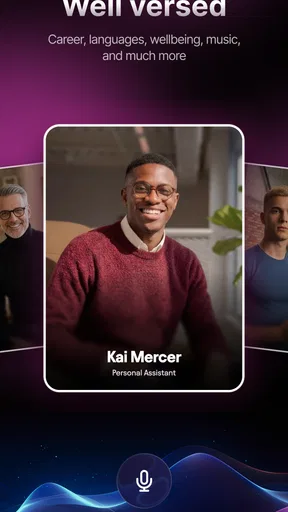
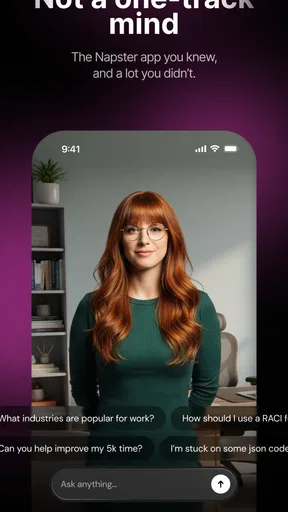
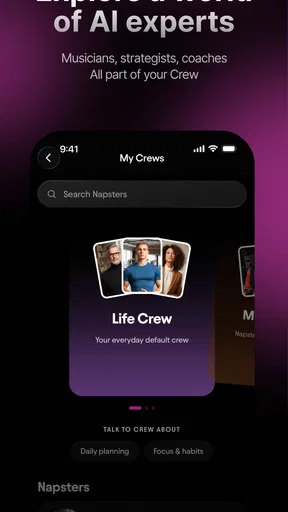
Napster is a music and audio app from Napster Music, Inc, with a concept that mixes listening with recommendations and expert-selected playlists. Its current identity also points toward AI musicians and live video collaboration, so it is worth checking what the app presents on your own device instead of assuming it works exactly like a conventional streaming catalogue. The key question for a newcomer is whether its way of guiding discovery feels useful, not whether it has every tool found in a familiar competitor.
There is a long history behind the name: the app was released on November 10, 2010. It is free to install, carries a Teen age rating, and has in-app purchases ranging from $1.99 to $489.00 per item. That wide purchase range is a reason to read each purchase screen carefully before confirming anything; the free download does not mean every feature or offering is necessarily free. I would explore first and decide later whether a paid option makes sense for my own use.
The app has a 3.3 average from around 166,000 ratings, alongside roughly 60,000 written reviews, and has passed 10 million installs. I take that as a signal to keep expectations measured: plenty of people have tried it, but the average suggests experiences are mixed. Rather than treating the score as a verdict, I’d use a short first session to check the parts that matter to me—finding music, understanding the interface, and deciding whether the app’s particular direction suits how I listen.
A calm route through first setup
On the first launch, I’d avoid trying to configure everything at once. Start with a search for a few artists or tracks you already enjoy, then spend a little time with the suggestions and playlists the app puts in front of you. A familiar starting point makes it easier to judge whether the recommendations are genuinely relevant or simply broad matches. If you are curious about the AI-focused side, look for the feature in the app’s current navigation and read its on-screen explanation before beginning; that keeps the first session grounded in what is actually available to you.
It also helps to separate discovery from commitment. You can form an opinion about the layout and music choices before deciding whether to explore any in-app purchase. If a prompt appears while you browse, pause to check what it offers and what it costs rather than tapping through automatically. That small habit matters especially here because the listed per-item purchase range is broad. A first-time user should be able to tell what is part of ordinary browsing and what requires a deliberate purchase before proceeding.
Finding the first genuinely useful listen
For a quick first win, I’d use the search bar to find one artist I know well, then branch out through a playlist or recommendation that feels connected to that choice. The point is not to judge the entire service from one result. Instead, see whether the next suggestion gives you a credible reason to stay: perhaps it introduces a nearby style, an unfamiliar artist, or a playlist that works for the moment you have in mind. If the first round misses, try a different anchor rather than assuming the app has already learned your taste.
A practical test is a short everyday listening session. Imagine you are getting ready in the morning and want music without spending ten minutes choosing it. Search for a familiar performer, pick a related playlist, and let it run while you make breakfast. If the choices keep the mood right without demanding constant attention, the app has done something useful. If you find yourself repeatedly correcting the direction or digging through menus, that is valuable information too: the service may be more enjoyable as an occasional discovery stop than as your default background player.
Where the experience can be confusing
One point to keep straight is that recommendations and expert curation are different kinds of guidance. An algorithmic suggestion is shaped by your listening activity, while an expert playlist reflects someone’s selection and sequencing. I would not expect those two paths to agree every time. When a recommendation feels off, try a curated playlist; when a playlist feels too broad, search for a specific artist and follow a narrower trail. Switching methods is often a better test than repeatedly refreshing the same kind of suggestion.
The AI language can also set expectations higher than a first session can meet. A recommendation system needs useful signals to become personal, so its early choices may feel generic until you have explored. And the app’s emphasis on AI musicians and live video collaboration is not the same thing as simply finding a song to play. If you came for straightforward, familiar streaming, check the available screens and decide whether those newer ideas are relevant to you; there is no need to make them the reason you keep using the app.
How discovery compares with familiar music apps
Compared with a basic player built around your own files, Napster is more about being led toward listening choices than managing a personal collection. Compared with mainstream streaming services, its mix of AI-oriented ideas and curated discovery gives it a more experimental feel, while established alternatives may be a better fit if your priority is a familiar interface or a particular set of listening habits. I would compare them using the same small test: search for a known artist, find a useful follow-up, and see how much effort it takes to get music suited to the moment.
Making recommendations more useful
A helpful way to evaluate personalization is to listen with a purpose instead of opening the app randomly. Try one session for a genre you already love and another for a style you want to explore. That distinction helps you tell whether the app is simply echoing your usual choices or offering a sensible route outward. If you are sharing a device or account with someone else, their listening may also blur what feels personal, so keep that in mind before judging the recommendations as inconsistent.
For a more deliberate discovery routine, save a note of artists you want to revisit outside the app or make a mental shortlist while you browse. That avoids confusing a promising one-off suggestion with a playlist you would actually return to. I also find it useful to give each listening path a fair chance: a recommendation can be good for finding a single new act, while a curated playlist may work better when I want a longer, coherent mood. Neither has to win every time.
Who is likely to enjoy it—and who may not
I can see Napster working for listeners who like exploring beyond their usual rotation and are open to a service whose identity includes more than standard play-and-search streaming. It may appeal to someone who wants to try playlists selected by music specialists, test how suggestions develop with use, or investigate the app’s AI and live-video direction. It is also an approachable option for a curious listener who wants to browse before deciding whether any paid item is worth considering.
I would look elsewhere if you mainly want a predictable library-first experience, dislike purchase prompts, or need a music app to behave exactly like a service you already know. It is also not the right choice if your decision depends on a particular feature that you have not personally checked in the current app. A quick inspection is better than building a routine around assumptions. The average rating of 3.3 is another reason to try it with a specific purpose rather than expect it to suit every listener.
Offline listening and the small practical trade-offs
Offline listening can be particularly useful when you know you will be without a reliable connection, such as on a flight or a road trip. My practical advice is to prepare before leaving: choose the music you want while you are connected and verify that it is available for offline playback in the app. Do not wait until you are already on a train or in an area with weak service to work out the process. This is a simple habit, but it turns an advertised capability into a dependable part of a travel routine.
Sound quality is personal as well as technical. A detailed track may be more rewarding with headphones than through a phone speaker, while casual background listening may not reveal much difference at all. I would test the app with the equipment and surroundings I actually use, rather than judge it from one quick listen in a noisy place. If an important listening session depends on consistent playback or a specific audio option, check that experience directly before making Napster your main setup.
A sensible next step after the first session
Once you have found one playlist or recommendation you genuinely like, make that the basis for a second visit. Search for a related artist, try a different mood, or see whether the app offers another path into the same style. This gives you a more realistic picture than browsing endlessly on day one. If the experience becomes easier and more relevant as you return, keep exploring. If it still takes too much effort, there is no reason to force it into your daily routine.
Before spending, consider what you want the purchase to change. Read the in-app description and price, then compare that benefit with how often you expect to use it. Since the listed purchase amounts span from $1.99 to $489.00 per item, I would never assume two prompts represent similar commitments. A deliberate choice is more sensible than paying simply because a screen interrupts browsing.
Sleek Design and Easy Navigation
One of the first things you'll notice about Napster - AI Music & Experts is its user-friendly interface. The app is designed with simplicity in mind, making it super easy to navigate through the vast library of songs. Whether you're a tech guru or someone who's just getting started with music apps, you'll find it pretty intuitive.
The app's clean layout ensures that everything is where you expect it to be. The search bar is prominently placed, so you can easily find your favorite tracks or discover new ones. Plus, the minimalistic design is not only easy on the eyes but also ensures that the app runs smoothly without any glitches.
AI-Powered Music Recommendations
Now, here's where things get interesting. The app boasts a robust AI-powered recommendation system that tailors music suggestions based on your listening habits. It's like having a personal DJ who knows exactly what you need to hear next. The more you use the app, the better it gets at understanding your musical preferences.
I was pleasantly surprised by the accuracy of the recommendations. From discovering hidden gems by indie artists to finding playlists that perfectly matched my mood, the AI feature truly enhances the listening experience. It’s pretty impressive how it learns and adapts over time.
Expert Curated Playlists
Aside from its AI features, Napster also offers expertly curated playlists. These playlists are crafted by music experts who know the ins and outs of the music world. Whether you're into jazz, rock, pop, or any other genre, there's a playlist that’s got you covered.
I found myself diving into genres I hadn’t explored much before, thanks to these curated lists. They’re a fantastic way to broaden your musical horizons and discover new artists. Plus, knowing that they’re put together by experts gives them an extra layer of credibility.
Offline Listening and Quality Sound
Another standout feature is the ability to download music for offline listening. This is a game-changer for those long flights or road trips where internet connectivity is sketchy at best. You can download your favorite songs and enjoy them anytime, anywhere.
The sound quality is top-notch as well. Whether you're using high-end headphones or just your smartphone speakers, the audio output is crisp and clear. It really makes a difference when you’re listening to tracks that rely heavily on intricate sound details.
Conclusion: A Must-Try for Music Lovers
All in all, Napster - AI Music & Experts is a solid choice for anyone looking to enrich their music streaming experience. With its intuitive design, AI-driven recommendations, and expertly curated playlists, it offers something for every type of listener. Whether you're a casual listener or a hardcore music enthusiast, this app has plenty to offer.
So, if you’re ready to take your music journey to the next level, give Napster a go. It might just become your new favorite app!
Verdict
Strengths of Napster - AI Music & Experts
- Extensive music library available.
- Highly intuitive user interface.
- Offline listening mode offered.
- Personalized playlists and recommendations.
- Integration with smart home devices.
Limitations of Napster - AI Music & Experts
- Subscription costs can be high.
- Limited free features available.
- Occasional app crashes reported.
- Some songs not available for offline.
- Ads present in the free version.
Similar Picks in This Category
View All
YouTube Music
Google LLC4.4

Samsung Music
Samsung Electronics Co., Ltd.3.8

Spotify: Music and Podcasts
Spotify AB4.3

JioSaavn - Music & Podcasts
Saavn Media Limited4.3

Lark Player:Music Player & MP3
Lark Player Studio - Music, MP3 & Video Player4.6

StarMaker: Sing Karaoke Songs
SKYWORK AI PTE. LTD.4.3
Frequently Asked Questions
What is Napster - AI Music & Experts?
Napster - AI Music & Experts is a music streaming app that combines traditional music streaming with AI-driven recommendations and expert-curated content. Users can explore a vast library of tracks while benefiting from personalized playlists and insights from music experts to enhance their listening experience.
How does the AI feature in Napster work?
The AI feature in Napster analyzes your listening habits, preferences, and even mood to suggest music that suits your tastes. It continuously learns from your interactions with the app to improve recommendations, ensuring that the music you discover is always aligned with your evolving preferences.
Is there a subscription fee for Napster?
Yes, Napster operates on a subscription model, offering various plans to suit different user needs. While there might be a free trial available, continued access to features like offline listening, high-quality audio, and ad-free streaming typically requires a paid subscription.
Can I download music for offline listening on Napster?
Yes, Napster allows users to download music for offline listening. This feature is particularly useful for those who want to enjoy their favorite tracks without relying on a constant internet connection, such as during travel or in areas with limited connectivity.
What devices are compatible with Napster - AI Music & Experts?
Napster is compatible with a wide range of devices, including Android and iOS smartphones and tablets. Additionally, it may be accessible on certain smart speakers and desktop platforms, allowing users to enjoy their music seamlessly across multiple devices.
